
Experiments with Unsharp Mask for Increasing Apparent Image Sharpness
by Roger N. Clark
This is an unsharp mask example in a series illustrating image sharpening methods.
The series:
Introduction to Sharpening
Unsharp Mask
Part 1
Part 2
Part 3.
Introduction
This page is dedicated to experiments in using unsharp mask (e.g. in Photoshop),
and how it can be used to improve the apparent sharpness of images. Unsharp mask
does not actually sharpen. Perceived sharpness in an image is a combination of the
resolution of fine details in the image, the apparent size of those details
as seen by the viewer, and the edge contrast (called accutance) in the image. Unsharp mask
only addresses edge contrast. Even so it can be quite effective, and is
simple and fast.
All images, text and data on this site are copyrighted.
They may not be used except by written permission from Roger N. Clark.
All rights reserved.
If you find the information on this site useful,
please support Clarkvision and make a donation (link below).
The Test
The Test target,
Figure 1 was blurred using a Gaussian blur with a radius =2.0. This blur
is similar to the blur that might be encountered in real images.
Figure 3 shows an attempt to restore the blurred image to the original test target
state. It was done by converting from RGB mode to Lab, then running unsharp
mask only on the lightness channel. Finally, the image was converted back to
RGB. The advantage of using the lightness channel in Lab space is that
colored highlights do not become white spots.
Try different combinations yourself. Save the images (I give permission to all
to experiment with the images, just not for sale and profit), then try
various ways to restore the blurred image to the original. The goal is to
not have ringing artifacts (which appear as halos around objects). Figure
3 shows some ringing, especially around the black target. Try to not make the
ringing any worse than in Figure 3. If you come up with a better solution,
email it to me and I'll add it to this page (with credit to you if you wish).
The original test target, a 16-bit/channel tiff file, 1 megabyte, is
here.

Figure 1. Original test target.
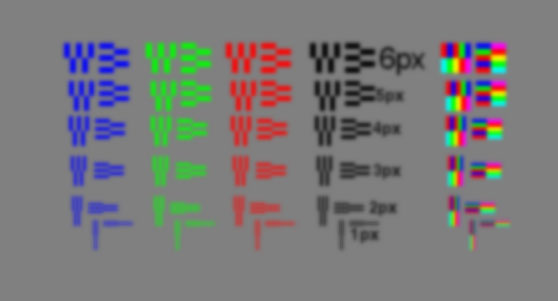
Figure 2. Test target blurred with Gaussian blur, radius=2.0.
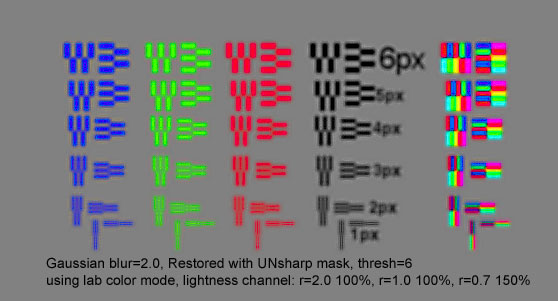
Figure 3. Test target restored with unsharp mask, parameters indicated on figure.
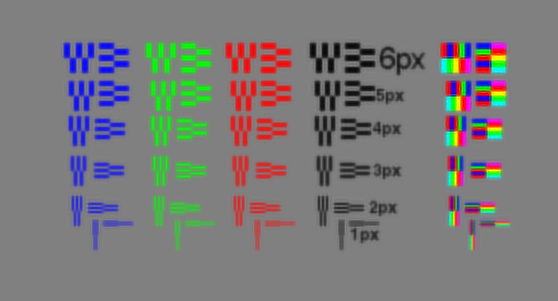
Figure 4. Image restored using adaptive Richardson-Lucy deconvolution
using a 7x7 Gaussian point spread function, 200 iterations followed by
unsharp mask with radius=0.3, 150%, threshold=3. The result is clearly
better and with fewer artifacts than the result in Figure 3.
Discussion
Multiple pass sharpening is popular among photographers, and it is more
effective than single pass. There is a scientific basis for multiple
pass sharpening: the blur can be described in Fourier space as
multiple frequencies. The unshapr mask using different radii
is simply boosting those different frequencies that were reduced due
to blur. However, unsharp mask is only enhancing edge contrast, which
gives the impression of sharpness. It does not improve true
resolution.
True resolution can be improved with image deconvolution methods, as
shown in Figure 4. Deconvolution methods are iterative solutions and
take some computer time. They tend to not be used by photographers
because these methods are not in many popular image editing programs.
But such methods are available in both commercial and open source image
processing programs that actually cost less than the big systems like photoshop.
Photoshop does not currently have multi-iteration deconvolution sharpening.
Most images in my galleries have had some unsharp mask applied. But a better
method in my experience is deconvolution methods, and my standard workflow includes
Apaptive Richardson-Lucy image deconvolution plus some modest unsharp
masking. Deconvolutions methods can actually improve resolution as
well as edge contrast, even correcting for some motion blur in an image.
More examples of unsharp mask, image deconvolution and the two combined
are illustrated in the rest of the sharpening series.
If you find the information on this site useful,
please support Clarkvision and make a donation (link below).
The series:
Introduction to Sharpening
Unsharp Mask
Part 1
Part 2
Part 3.
This page URL:
http://clarkvision.com/articles/unsharpmask
First published November, 2002.
Last updated February 22, 2014